
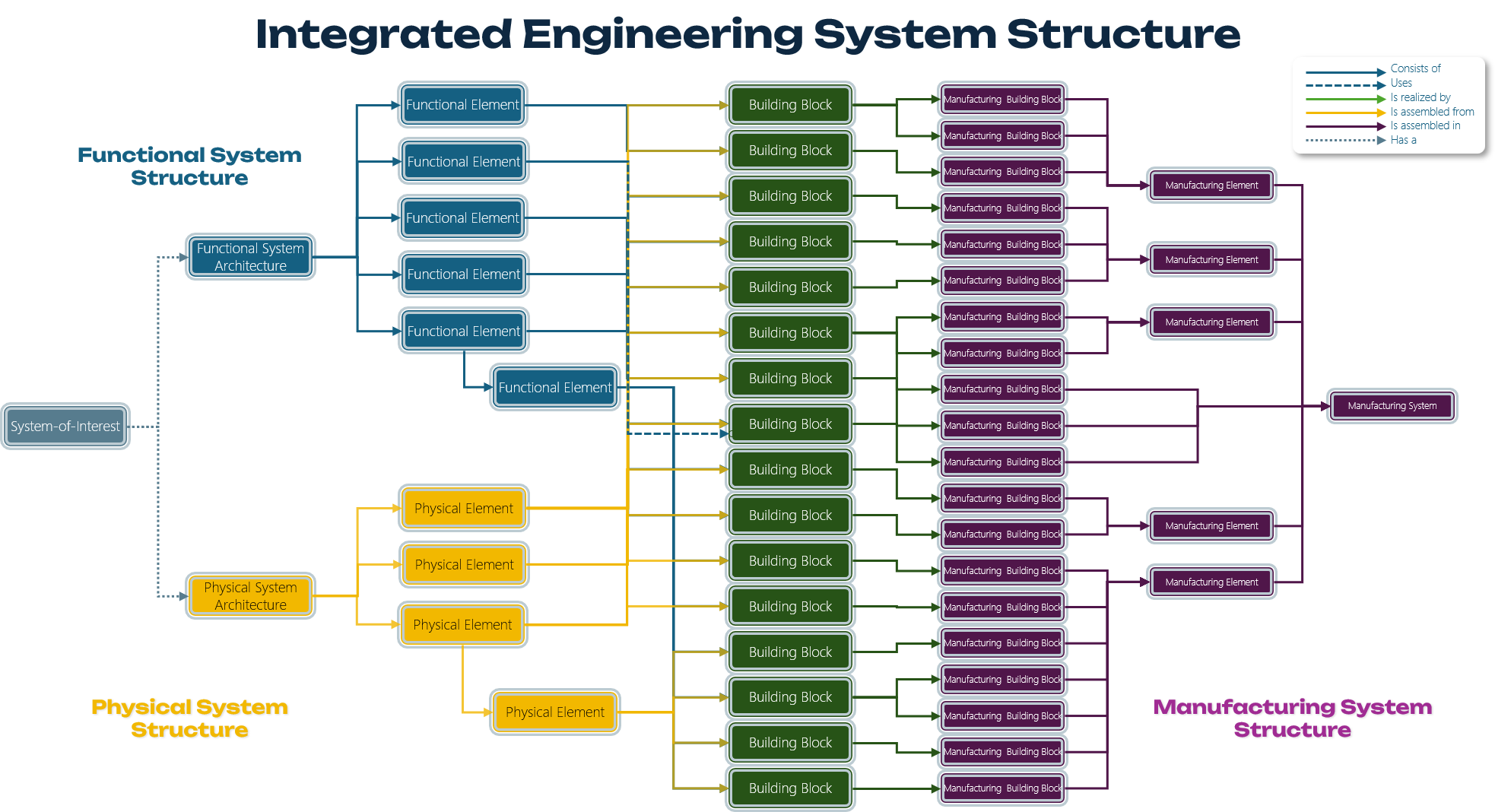
Integrated Engineering System Structure
A coherent engineering model that connects what a system must accomplish, which physical Building Blocks provide that functionality, and how those Building Blocks are organised into a producible physical system.
A product is more than a list of parts
A conventional Engineering Bill of Material primarily describes physical composition. It does not fully explain why the elements exist, which functions they fulfil, or how multiple product variants relate to one stable system architecture.
IMPULS3 therefore treats the functional structure, Building Block catalogue and physical structure as an interconnected whole: the Integrated Engineering System Structure.
Three structures that must be understood together
Each perspective answers a different engineering question. None of them is sufficient on its own.
Functional Element Structure
The functional structure describes what the system and its subordinate elements must accomplish. Functional Elements are named as functions, using verbs and nouns.
Building Block Catalogue
Building Blocks are identifiable physical entities that fulfil functions and possess their own properties and constraints. The catalogue may contain all Building Blocks needed across all product variants.
Physical Element Structure
The physical structure describes how Building Blocks are grouped into physical or production modules and how the complete system is assembled.
The distinctive role of the Building Block
A Building Block is the bridge between functional intent and physical product structure.
A physical entity with functional meaning
A Building Block may fulfil one or more functions and has its own physical and performance characteristics, such as mass, volume, dimensions, capacity, reliability or power consumption.
It may be internally complex and may contain Parts. However, within the IMPULS3 architecture, a Building Block does not consist of subordinate Building Blocks.
A Building Block contributes to the functional behaviour of the system.
A Building Block is an identifiable physical entity with measurable characteristics.
Exactly one Functional Element has a consists of relation with a particular Building Block.
Other Functional Elements may use the same Building Block without becoming its functional owner.
Hierarchical, but not necessarily a tree
The functional and physical structures contain hierarchies, but the total engineering model is a network. A Building Block may contribute to several Functional Elements while appearing at a specific location in the physical assembly structure.
The same Top Bun may also be used by “Enable Handheld Consumption”, without changing the Building Block itself.
Add a product variant without redesigning the model
In IMPULS3, product variants are created by changing which relationships are valid—not by copying structures or redefining existing engineering elements.
The functional architecture, physical architecture and existing Building Blocks retain their identity and meaning.
What is actually required to add one alternative?
The default relation has no Condition. When a Condition such as vegetarian becomes valid, Condor selects the matching relation from the applicable XOR variation point.
REL-01 | FE-02 | BB-03 | consists of | X-01 | -
REL-02 | FE-02 | BB-12 | consists of | X-01 | vegetarian
Why this is significant
The unconditioned relationships already define the default configuration. There is no special “standard variant” structure to maintain.
A Functional Element remains a function. A Building Block remains a physical entity. Neither needs variant-specific wording.
Requirements, analysis statements, properties and design information remain connected to the same stable Nodes.
Alternative Building Blocks coexist in one overcomplete model. Conditions determine which paths form a valid 100% configuration.
Variation points and Conditions are explicit Relations rather than hidden assumptions or duplicated structures.
Default configuration: Classic Hamburger
Three independent modelling concerns
IMPULS3 separates element meaning, architecture and configuration logic.
Nodes define elements
A Node defines the identity and purpose of an engineering element independently of its relationships.
Relations define architecture
Relations express functional decomposition, functional use, physical assembly and other architectural semantics.
Conditions define configuration
Conditions and XOR groups determine which alternative Relations are valid for a selected product variant.
A stable architecture for changing product families
Relation-centric variability enables product families to evolve without repeatedly redefining or duplicating the underlying engineering concepts.
Architectural stability
Existing Nodes retain their identity and meaning when new variants are introduced.
Reduced duplication
Alternative configurations reuse stable engineering elements rather than copying complete structures.
Preserved traceability
Existing links to requirements, analysis and design information remain valid.
Explicit variation points
XOR groups make architectural choices visible, inspectable and configurable.
Localised change
A new variant affects only the relevant alternative Building Blocks and Relations.
150% product definition
One overcomplete Building Block catalogue can support all valid system variants.
The static structure is the foundation, not the production sequence
The Integrated Engineering System Structure defines what the system is. A connected Manufacturing Process Structure can subsequently describe how instances of that system are produced.
Integrated Engineering System Structure
Defines the stable product architecture.
- Functional Elements
- Building Blocks
- Physical Elements
- Variant relationships
Manufacturing Process Structure
Defines the ordered actions required to realise the product.
- Manufacturing Operations
- Product States
- Production Resources
- Precedence and material flow
Stable elements. Explicit architecture. Configurable relationships.
The Integrated Engineering System Structure brings functional intent, physical realisation and product composition together without forcing them into a single parts tree.
 References